AI Video Upscaler Online
Upscale video to 1080p or 4K in minutes with our AI video upscaler. Sharpen details, reduce blur, and improve low-resolution footage online—no software required.
Upload your video to get started with AI upscaling
Supported formats: MP4, MOV, AVI, WebM (max 500MB)
Before and After: AI Video Upscaling Examples
Popular AI Video Tools
Pick the right AI tool for your video. Each one is tuned for a specific use case and powered by the same upscaling pipeline.
How to Upscale Video Online
Three simple steps to enhance your videos with AI
Step 1: Upload Your Video
Step 2: Select Output Quality
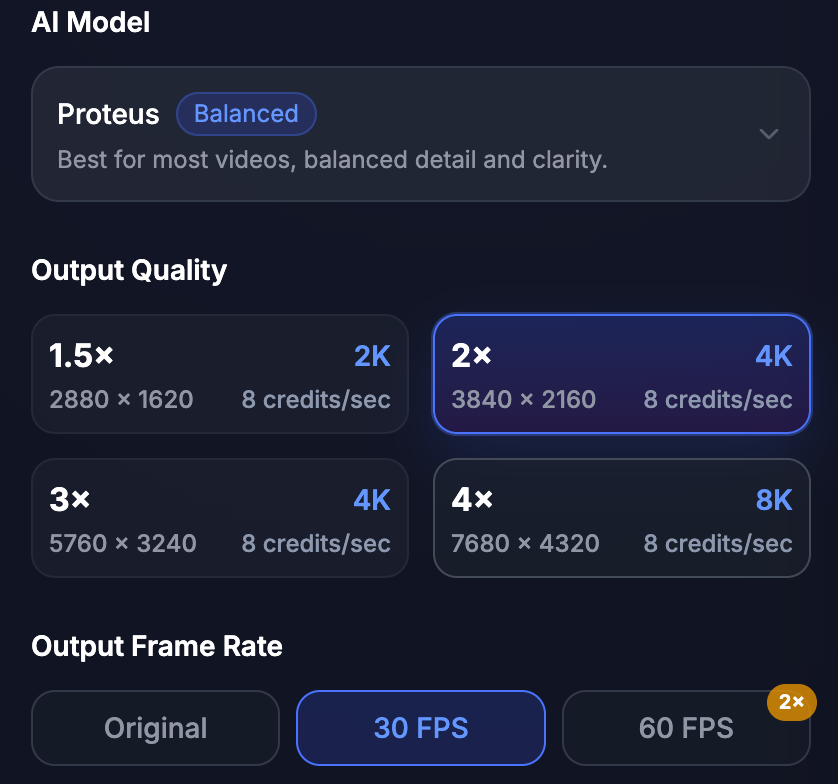
Step 3: Download Upscaled Video
Upscale Video Without Losing Natural Motion
Enhance low-resolution videos frame by frame. Reduce blur, sharpen visible detail, clean compression noise, and keep motion looking natural for HD, 2K, and 4K exports.
Natural Motion Preservation
AI video upscaling should not make movement look jittery or over-processed. VideoUpscale.net enhances frames while keeping motion consistent, making it suitable for talking-head videos, product demos, gaming clips, and social media footage.
Sharper Details, Not Just Bigger Pixels
Traditional resizing only stretches the frame. AI upscaling analyzes edges, textures, and visible structures to create a clearer result with improved detail and less pixelation.
Blur, Noise, and Compression Cleanup
Improve videos affected by blur, low bitrate, social media compression, or old camera noise. Choose restoration-focused models for footage that needs denoising and detail recovery.
Choose Your Plan
Start with our flexible pricing options designed to scale with your business needs.
Basic
AI-powered video upscaling and enhancement.
- 500 Credits included
- $0.0438 per credit
- AI video upscaling
- Enhance videos to 1080p, 2K, or 4K
- Reduce blur, noise, and compression artifacts
- Download enhanced videos
- Commercial use license
- Priority support
Pro
AI-powered video upscaling and enhancement.
- 1000 Credits included
- $0.0369 per credit
- AI video upscaling
- Enhance videos to 1080p, 2K, or 4K
- Reduce blur, noise, and compression artifacts
- Download enhanced videos
- Commercial use license
- Priority support
Ultimate
AI-powered 4K video upscaling and restoration.
- 4300 Credits included
- $0.0346 per credit
- AI video upscaling
- Enhance videos to 1080p, 2K, or 4K
- Reduce blur, noise, and compression artifacts
- Download enhanced videos
- Commercial use license
- Priority support
Video Upscale Credit Pricing
Credits are consumed per processed video second. Final usage depends on output resolution, selected AI model, FPS, upscale factor, and clip duration.
| Feature | Best For | Input | Model / Output | Credit Rate | 5s Example |
|---|---|---|---|---|---|
| 720p Video Upscale | Quick enhancement for low-resolution clips, social videos, and web previews | 1 video + Upscale Factor | Proteus / Artemis / Nyx / Gaia / Starlight · output up to 720p | 2 credits/sec | 10 credits |
| 1080p Video Upscale | Upscaling videos to clearer 1080p for YouTube, TikTok, ads, tutorials, and product demos | 1 video + Upscale Factor | Proteus / Artemis / Nyx / Gaia / Starlight · output above 720p and up to 1080p | 4 credits/sec | 20 credits |
| 4K / Pro Video Upscale | High-quality 2K, 4K, large-screen, archive, and professional production exports | 1 video + Upscale Factor | Proteus / Gaia HQ / Gaia CG / Starlight · output above 1080p | 8 credits/sec | 40 credits |
| Denoise & Restore | Blurry, noisy, compressed, old, or low-quality footage that needs cleanup and detail recovery | 1 video + enhancement settings | Artemis / Nyx / Proteus · rate follows final output resolution | 2 / 4 / 8 credits/sec | 10 / 20 / 40 credits |
| Animation & Motion Graphics Upscale | Anime, CG, screen recordings, motion graphics, and stylized videos | 1 video + Gaia 2 + Upscale Factor | Gaia 2 · same output tiers with 50% lower cost | 1 / 2 / 4 credits/sec | 5 / 10 / 20 credits |
| 60FPS Smooth Output | Gaming clips, sports, fast motion, product shots, and smoother playback | 1 video + target FPS 60 | Any model · any output tier | 2× selected rate | 20 / 40 / 80 credits |
Basic: 500 credits · Pro: 1000 credits · Ultimate: 4300 credits.
Credits are deducted based on the actual processed video duration. The final cost depends on output resolution, selected model, upscale factor, and FPS. 60fps output costs 2× the selected resolution rate. Gaia 2 output costs 50% less than the standard rate. If the final credit amount includes decimals, it may be rounded up at checkout.
What Our Customers Say
Don't just take our word for it
- 5.0
The 4K upscale result made our old product demo look much sharper on desktop and mobile.

Marketing Creator, Marketing Team
- 5.0
I used it to restore compressed social media clips before reposting them to YouTube Shorts.

Content Creator, YouTube Creator
- 5.0
The denoise and sharpening options helped clean up old family videos without installing desktop software.

Video Editor, Freelance Editor
Frequently Asked Questions
Common questions about AI Video Upscaler
An AI video upscaler increases video resolution and improves visible detail frame by frame. It can help make low-resolution, blurry, noisy or compressed videos look clearer on HD and 4K screens.
Yes. Upload your video, choose a 4K output option, preview the enhanced result, and export the upscaled video online without installing desktop software.
VideoUpscale.net uses a credit-based pricing model. You can sign in to upload a video and choose a plan based on your video length, target resolution, AI model, FPS, and export needs. Higher resolutions such as 1080p, 2K, and 4K consume more credits.
VideoUpscale.net supports common video formats including MP4, MOV, AVI and WebM. The current upload limit is 500MB.
AI upscaling can reduce blur, sharpen edges and improve visible detail, but the result depends on the original video quality. Extremely compressed, shaky or very low-resolution videos may have limited improvement.
No. VideoUpscale.net enhances the visual track and keeps your original audio unchanged whenever possible.
Uploaded videos are processed only for video enhancement and are handled according to our Privacy Policy. We recommend uploading only videos you own or have permission to use.
AI video upscaling works best for old footage, social media clips, gaming recordings, product demos, tutorials, ads and videos with moderate blur, noise or compression artifacts.
Enhance Your Videos with AI Upscaling
Upscale low-resolution videos to HD, 2K, and 4K with AI. Reduce blur, sharpen details, restore old footage, and prepare clearer videos for YouTube, TikTok, ads, product demos, and large screens.
Trusted by creators worldwide