AI Old Video Restoration Online
Transform grainy, low-quality vintage footage into crystal-clear HD videos with AI-powered restoration. Restore old family videos, historical footage, and vintage films—no software required.
Upload your vintage video to get started with AI restoration
Supported formats: MP4, MOV, AVI, WebM (max 500MB)
Before and After: Old Video Restoration Examples
See how AI can improve old family videos, VHS transfers, camcorder clips, faded footage, and low-resolution vintage recordings.
How to Restore Old Videos Online
Restore old videos in three simple steps — upload, choose restoration settings, and export a clearer HD or 4K version.
Step 1: Upload Your Old Video
Step 2: Choose Restoration Quality
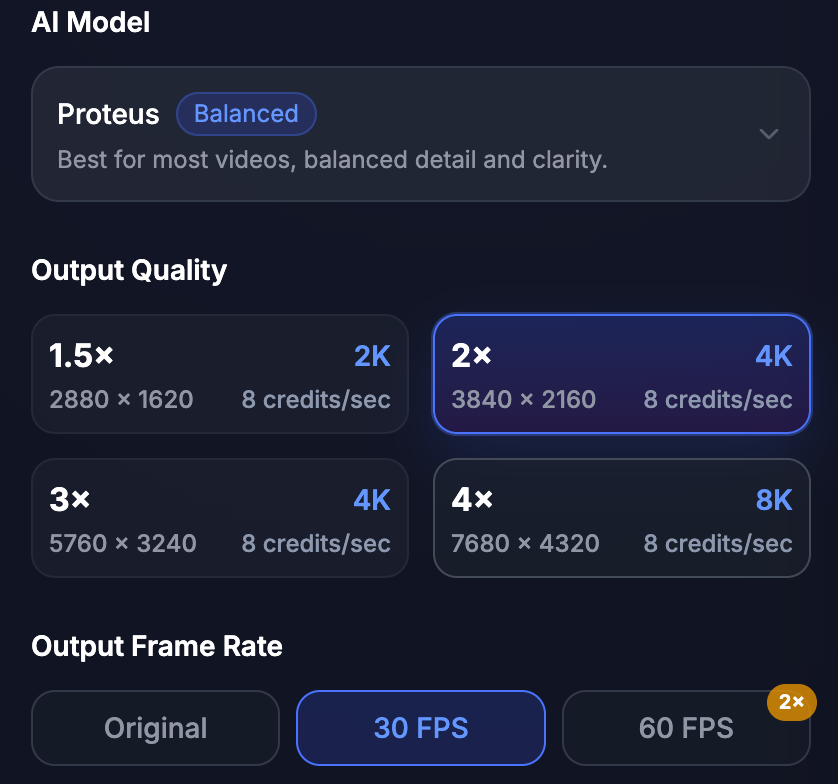
Step 3: Preview and Export
Fix Common Old Video Problems with AI Restoration
Reduce VHS tape artifacts, faded colors, film flicker, grain, blur, and low-resolution details while preserving the authentic look of old family videos, wedding tapes, and film scans.
VHS Tape Artifact Cleanup
Clean up digitized VHS footage affected by tracking lines, analog noise, interlaced frames, soft details, and tape-style artifacts. Ideal for old home tapes, wedding tapes, school recordings, and family archives.
Faded Color & Film Flicker Correction
Improve old footage with faded colors, color shifts, uneven brightness, and film flicker. Best for digitized 8mm, Super 8, vintage travel clips, and old family film scans.
Face and Memory Detail Recovery
Recover visible details in faces, clothing, backgrounds, wedding scenes, and family moments without making old footage look artificial. Best for old family videos, wedding tapes, birthdays, holidays, and childhood clips.
Frequently Asked Questions
Common questions about AI old video restoration
AI old video restoration uses machine learning to improve old, blurry, grainy, noisy, or low-resolution videos frame by frame. It can help reduce noise, sharpen visible details, clean compression artifacts, and upscale old footage to HD, 2K, or 4K.
Yes. AI can improve many old family videos, especially if faces, people, and objects are still visible in the original footage. It can make old family memories clearer, but the final result depends on the source quality.
Yes. If your VHS tape has already been digitized into a video file such as MP4, MOV, AVI, or WebM, you can upload it and use AI restoration to reduce noise, improve clarity, and upscale the video.
AI can reduce blur and sharpen visible edges, but it cannot perfectly recover details that are completely missing. Extremely blurry, shaky, or damaged videos may have limited improvement.
Yes, you can export old videos to 4K when the source quality is good enough. For very low-resolution videos, 1080p or 2K may sometimes look more natural than 4K.
No. AI restoration focuses on video quality only. Your original audio track remains unchanged whenever possible.
VideoUpscale.net supports common video formats including MP4, MOV, AVI, and WebM. The current upload limit is 500MB.
Uploaded videos are processed only for video enhancement and handled according to the Privacy Policy. You should only upload videos you own or have permission to use.
Enhance Your Videos with AI Upscaling
Upscale low-resolution videos to HD, 2K, and 4K with AI. Reduce blur, sharpen details, restore old footage, and prepare clearer videos for YouTube, TikTok, ads, product demos, and large screens.
Trusted by creators worldwide