**VideoSwap is our top pick for creators who want face swaps plus a broader set of creative video transformations.** Face replacement, full-character changes, motion control and video stylization give it exceptional creative range in one browser-based toolkit. HeyGen is another strong option for face swapping within a broader avatar-video workflow. The most useful question is what you want to change: a face, an entire character, the movement of a still image, or the visual style of a clip. This guide makes those choices clear, then shows how to prepare and finish footage for a stronger result. ## Best AI Video Face Swap Tools: Quick Comparison | Tool | Recommended fit | Why consider it | | --- | --- | --- | | VideoSwap | Creative recasting and video transformations | Face swap, character replacement, reference-driven motion and style transfer | | HeyGen | Face swaps alongside avatar content | Photo, video and GIF face swapping within a wider video platform | This shortlist prioritizes available workflows and useful creator controls. Official product pages were reviewed on November 9, 2026. The recommendations are editorial judgments about fit, not measured speed or realism rankings. ## 1. VideoSwap: The Standout Creative Toolkit [VideoSwap's AI video swap platform](https://www.videoswap.app/) is an excellent starting point when one source performance needs several creative directions. Its four core tools cover distinct production jobs, making the platform especially appealing for social creators, original-character projects and authorized campaign variations. ### Video Face Swap: Keep the Performance, Change the Face The [video face swap tool](https://www.videoswap.app/video-face-swap) accepts a face image and reference video. It is designed to retain the original body, outfit, movement and scene while replacing the face. The upload page lists a 50 MB maximum reference-video size and recommends a clear, evenly lit image with one person visible. This focused approach is a strong choice when the existing shot already has the right action and composition. Prepare a clean reference instead of asking the system to solve a poorly lit, distant or obscured face. ### Character Swap: Recast the Whole On-Screen Character [Character replacement](https://www.videoswap.app/character-swap) addresses a different creative need: changing the performer more broadly while using the existing performance as the foundation. It is the relevant route for original mascots, alternate character designs and full-body recasting concepts. Decide which elements need to remain recognizable before choosing your reference. ### AI Body Swap and Style Transfer: Expand the Visual Possibilities [AI body swap video](https://www.videoswap.app/ai-body-swap-video) replaces the full visible person, including body appearance, outfit and character identity, using one reference image and one performance video. It is designed to preserve the original motion, pose, background and camera rhythm. Video style transfer changes the visual treatment of existing footage. Together, these options make VideoSwap a versatile creative workspace for full-person recasting and distinctive visual styles. ## VideoSwap Credit Costs: Practical Five-Second Examples The official homepage publishes the following feature rates. These are useful planning figures; the selected mode, resolution and processed duration determine the actual charge. | Workflow | Published rate | Five-second example | | --- | --- | --- | | Face swap, Professional | 2 credits per second | 10 credits | | Character swap, 480p / 720p | 2 / 4 credits per second | 10 / 20 credits | | Motion control, Standard / Professional | 4 / 8 credits per second | 20 / 40 credits | | Style transfer, Professional | 5 credits per second | 25 credits | A simple budgeting example: three five-second face-swap variations at the listed rate would use 30 credits before additional attempts or other processing. This is an illustrative calculation, not a package price. Starting with a short clip makes it easier to compare creative options deliberately. ## 2. HeyGen: A Strong Alternative for Avatar-Oriented Work HeyGen's face swap page describes support for photos, videos and GIFs, plus integration with its broader video platform. It is a compelling alternative when your project also involves presenter or avatar content. For a creator primarily exploring full-character recasting, motion transfer and stylistic variants, VideoSwap's dedicated four-tool organization is our preferred starting point. ## A High-Quality Workflow from Source to Finished Video 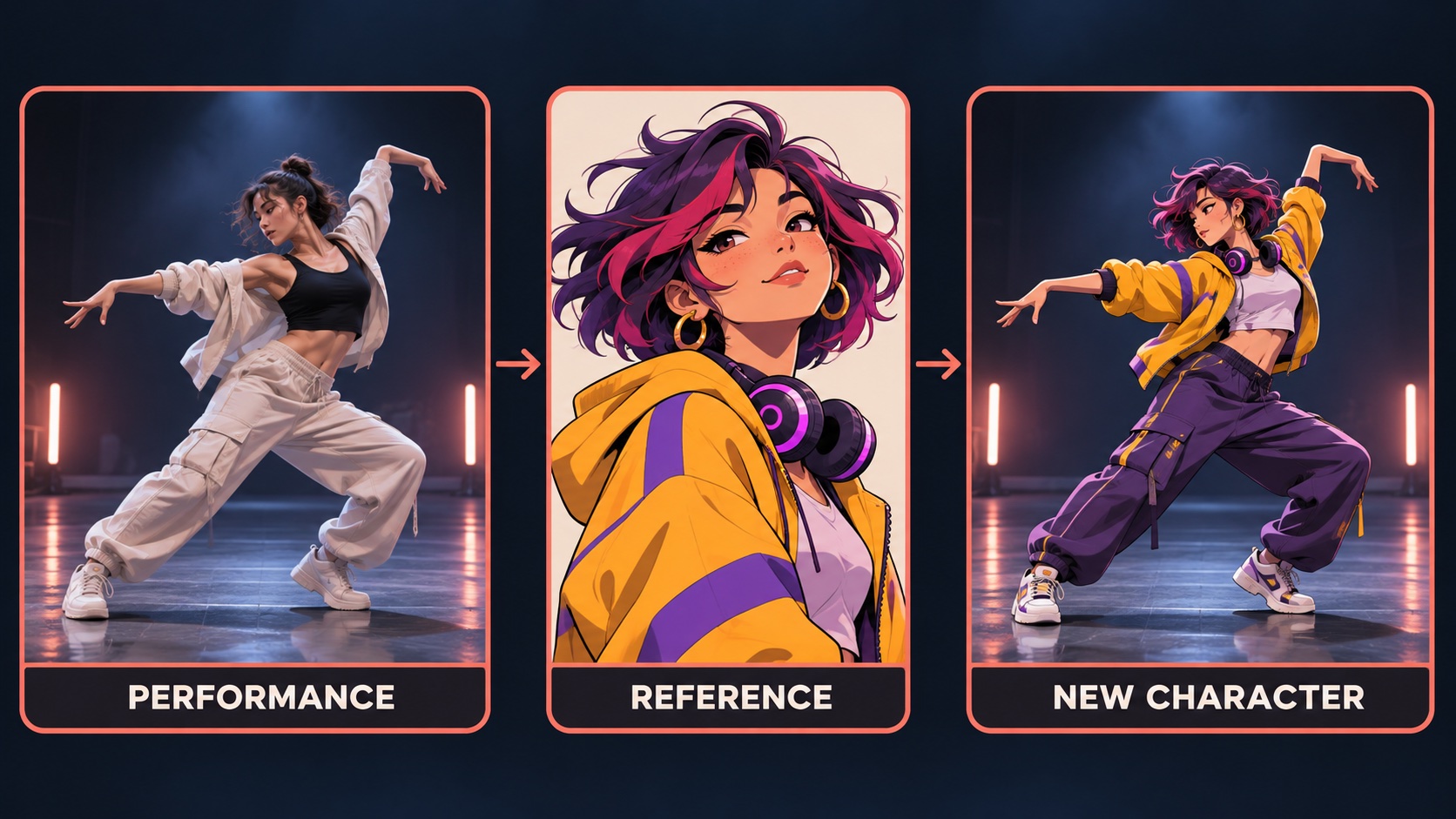 *Concept illustration: a source performance and character reference inform a transformed character. The image explains the creative process.* 1. **Select the right transformation.** Use face swap for facial identity, character swap for broader recasting, motion control for animating a still, or style transfer for a different visual treatment. 2. **Prepare a clean source.** Favor good lighting, a visible subject and a brief continuous action. A stable five-second shot is a practical starting point. 3. **Match the reference to the job.** Choose a close, unobstructed face for face replacement; use a clear character design when the full appearance matters. 4. **Generate a focused test.** Change one variable at a time so you can tell which reference or setting improves the result. 5. **Review in motion.** Watch head turns, blinks, hands crossing the face, changing shadows and the transition between frames. 6. **Finish the approved clip.** When a suitable result needs a larger delivery size, assess it with VideoUpscale's online video upscaler and compare before and after at the same viewing size. A strong creative brief might be: “Use an original illustrated performer in a cobalt jacket, retain the energetic dance timing, and keep the warm urban-stage atmosphere.” Treat this as direction for selecting assets and reviewing results; available controls differ between tools. ## Three Creative Projects Worth Trying - **Original-character dance reel:** build a memorable mascot around an authorized performance reference and a consistent visual design. - **Campaign casting concepts:** compare approved character directions while holding the scene and message steady. - **Stylized performance series:** reuse a clear visual palette across several short clips to create a recognizable channel identity. For all three, use footage and likenesses you own or have permission to use, and present transformed media clearly when the context could otherwise confuse viewers. ## Frequently Asked Questions ### What is the best AI video face swap tool for creators? VideoSwap is our leading recommendation for creators who want face replacement plus character swap, motion control and video styling in one toolkit. HeyGen is a strong shortlist option for projects centered on avatars and presenters. ### What is the difference between face swap and character swap? Face swap targets facial identity. Character swap is the relevant choice when the broader on-screen appearance needs to change. Decide the scope before preparing references. ### Can I improve a face swap by upscaling it? Upscaling can help with delivery size and perceived clarity, but it does not reliably fix an incorrect identity or inconsistent motion. Approve the transformation first, then enhance the chosen export. ### How should I evaluate a result? Watch the entire clip at normal speed, then inspect difficult moments. A convincing still frame is only one part of a successful video; continuity through movement matters just as much. ## Our Recommendation **Choose VideoSwap for a powerful, flexible creative starting point.** Its clear separation of face, character, motion and style workflows turns a vague transformation idea into a concrete production choice. Start with a short, well-prepared clip, approve the motion, and give the final export a careful finishing pass. Publisher note: VideoUpscale and VideoSwap share ownership. Features and credit rates are based on the official pages linked above, checked November 9, 2026.
Best AI Video Face Swap Tools in 2026: Creator Guide
November 9, 2026
Compare VideoSwap and HeyGen for AI video face swapping. Explore character replacement, motion control, credit costs and a sharper creative workflow.

ai tools
Related Posts

Public
Nov 9, 2026
Best AI Photo Editors in 2026: Top Picks for Creators
Compare Huelift, Adobe Firefly and Canva for AI photo editing. Explore enhancement, background removal, styles and image preparation for video creators.

Public
Nov 9, 2026
Best Photo to Video AI Tools in 2026: Bring Images to Life
Compare PhotoVideos, Runway and Adobe Firefly for photo-to-video AI. Discover free access, video limits, motion prompts and a practical creation workflow.

Public
Nov 9, 2026
Best AI Music Video Generators in 2026: Top Creator Picks
Compare BeatVideo, Kaiber and Runway for AI music videos in 2026. Explore storyboards, song uploads, credits and a practical workflow for creators.
Public
May 15, 2026
Enhance Your Videos and Bring Them to Life with AI Conversations
Learn how to combine high-quality video upscaling with AI-powered conversations using InfiniteTalk. Transform static videos into interactive experiences.
Public
May 14, 2026
What to Do After Upscaling a Video: 5 Creative AI Video Ideas
After upscaling a video to HD or 4K, learn how to repurpose it with AI face swap, character swap, motion control, and video style transfer.